> ## Documentation Index
> Fetch the complete documentation index at: https://docs.trycrust.ai/llms.txt
> Use this file to discover all available pages before exploring further.
# Understanding Snippet Types
> Learn the difference between Single Item and Multiple Items snippets and how this core choice impacts your mini-application's structure and purpose.
**First Key Decision**\
The first and most fundamental decision you make when creating a new snippet in Crust AI is selecting its **Snippet Type**. This choice determines the core structure and purpose of the mini-application, specifically whether it focuses on displaying the details of a single record or presenting a list of multiple records.
## Single Item vs. Multiple Items Snippets
Crust AI offers two distinct snippet types to cover the most common data visualization and sharing needs:
| Feature | Single Item Snippet | Multiple Items Snippet |
| :------------------ | :------------------------------------------------------------------------------------------------------------------------------------------------------------------------------------------------------------------------------------------------------------------------------------------------------------------------------------------------------------------------------------------------------------------------------------------------------------------------------------------------------------------------------------------------------------------------------------------------------------------------------------------------------------------------------------------------------------------------------------------------------------------------------------------------------------------------------------------------------------------------------------------------------------------------------------------------------------------------------------------------------------------------------------------------------------------------------------------------------------------------------------------------------------------------------------------------------------------------------------------------------------------ | :-------------------------------------------------------------------------------------------------------------------------------------------------------------------------------------------------------------------------------------------------------------------------------------------------------------------------------------------------------------------------------------------------------------------------------------------------------------------------------------------------------------------------------------------------------------------------------------------------------------------------------------------------------------------------------------------------------------------------------------------------------------------------------------------------------------------------------------------------------------------------------------------------------------------------------------------------------------------------------------------------------------------------------------------------------------------------------------------------------------------------------------------------------------------------------------------------------------------------------------------------------------------------------------------------------------------------- |
| **Purpose** | Designed to focus on and display the comprehensive details of **one specific record** from your chosen table. | Designed to display a **list of records** from your chosen table. These records can be filtered and sorted according to criteria you define. |
| **Use Cases** | Sharing a single client's complete profile
Showing the status of a single project
Providing detailed information about one product in your inventory
Presenting the specifics of one legal case. | Creating a dashboard of all *active* marketing campaigns
Building a client portal showing all *pending* legal matters for a specific client
Listing *all* products currently in stock. |
| **Primary View(s)** | This type includes one view:
• **Detail View**, showing all relevant fields for that singular record. | This type includes two interconnected views:
• **List View:** The initial display showing a summarized list or overview of multiple records.
• **Detail View:** When a user clicks on a specific item in the List View, they navigate to a detailed view of that individual record. |
| **Preview** | 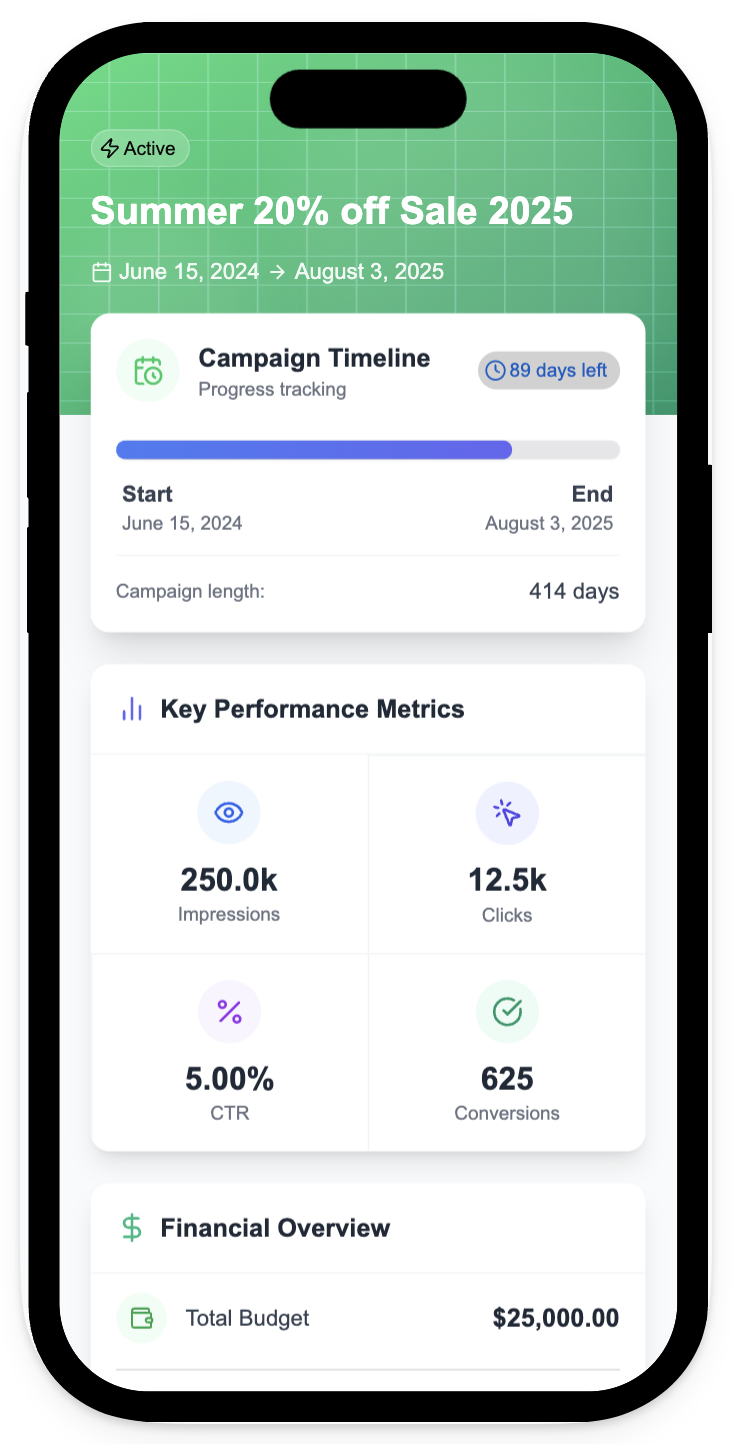 |
| 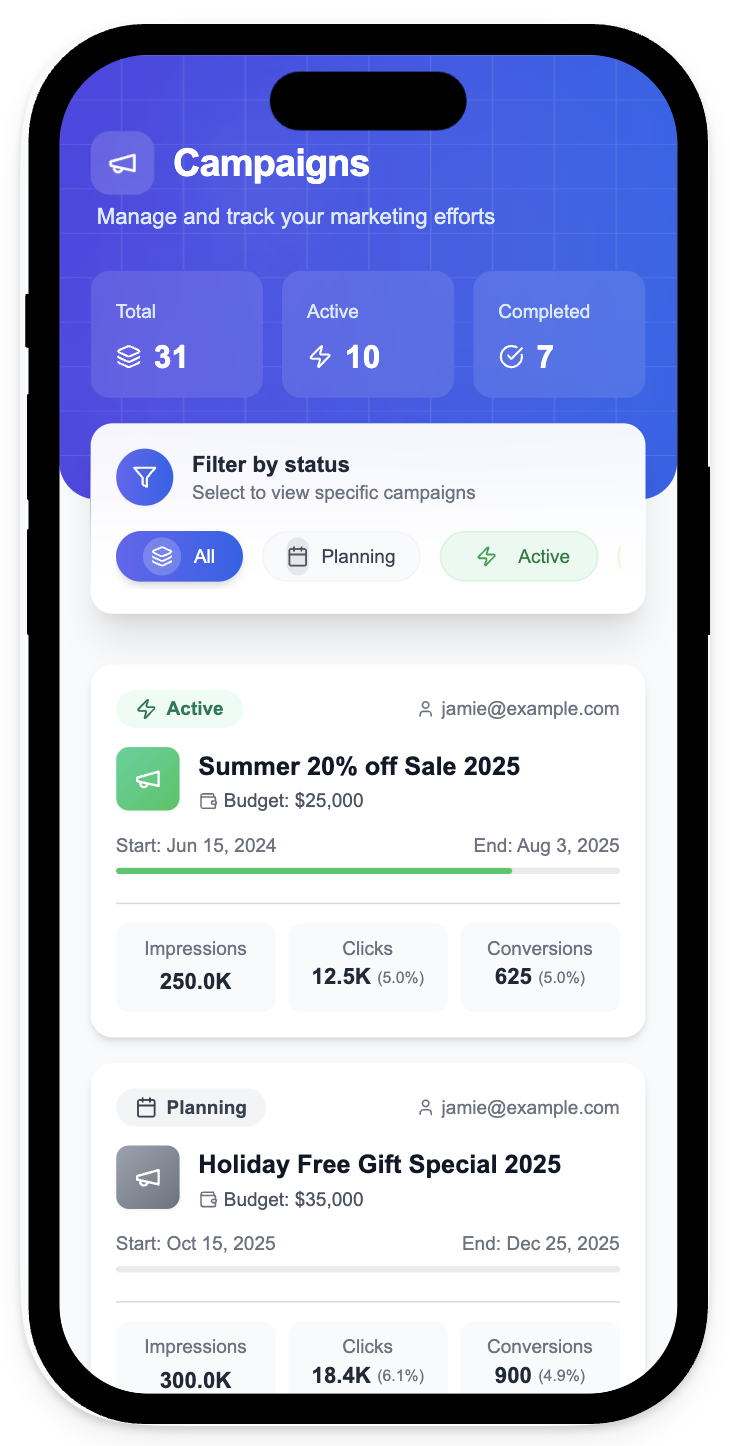 |
The List View provides a high-level overview, and the Detail View provides the granular information for each item in that list.
***
## Views and Navigation
Every snippet has at least a **Detail View**. A Single Item snippet *only* has a Detail View because its purpose is to show the full information for one predetermined record.
A Multiple Items snippet has both a **List View** and a **Detail View**. The **List View** is the default view when the snippet is opened. From the List View, users can click on any individual item (record) in the list to automatically navigate to that record's **Detail View**.
|
The List View provides a high-level overview, and the Detail View provides the granular information for each item in that list.
***
## Views and Navigation
Every snippet has at least a **Detail View**. A Single Item snippet *only* has a Detail View because its purpose is to show the full information for one predetermined record.
A Multiple Items snippet has both a **List View** and a **Detail View**. The **List View** is the default view when the snippet is opened. From the List View, users can click on any individual item (record) in the list to automatically navigate to that record's **Detail View**.
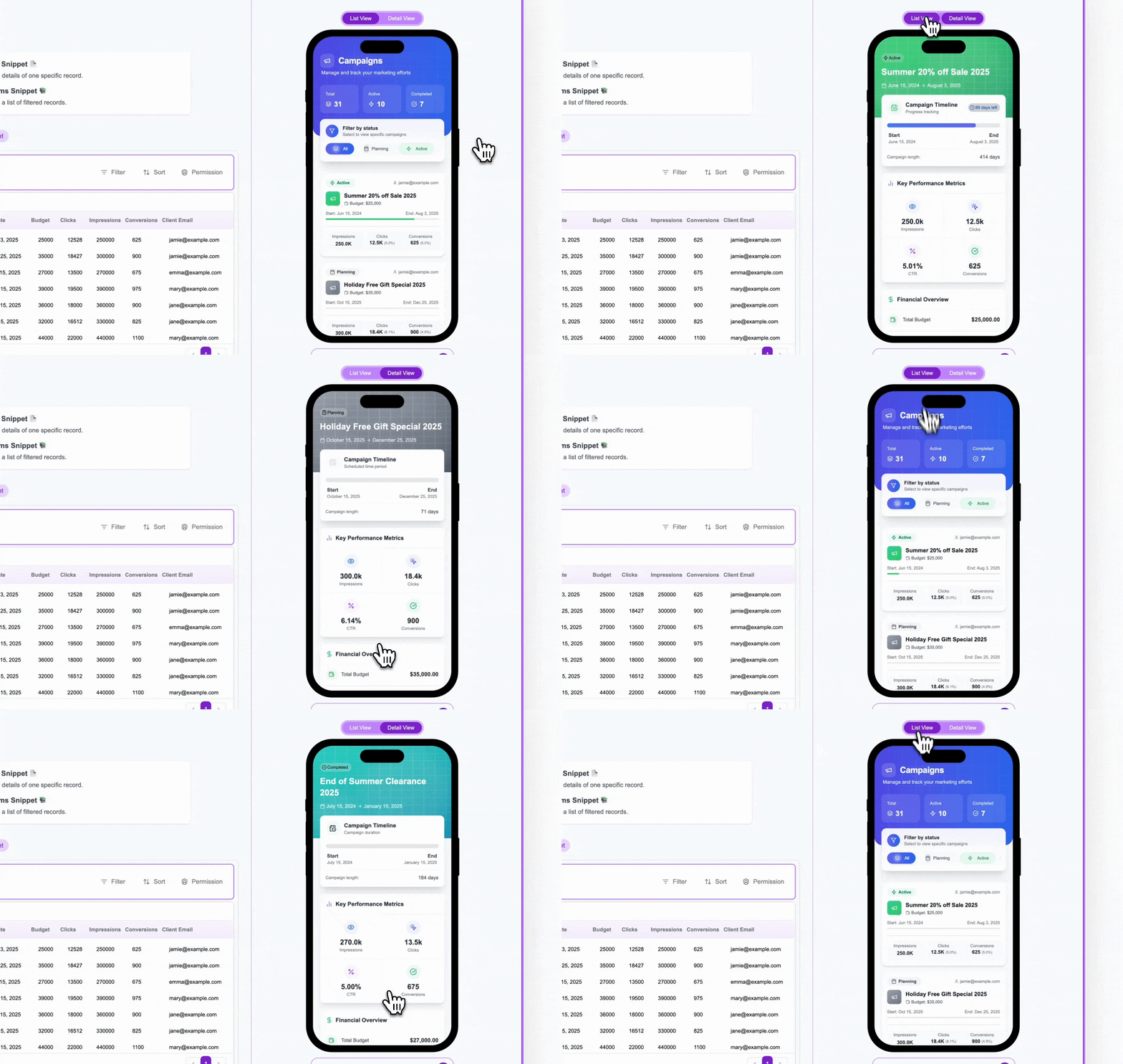 When viewing the Detail View of an item within a Multiple Items snippet:
* In the Crust AI **Snippet Builder interface**, you can use the "List View" toggle button above the phone preview to return to the List View.
* In the **live, published snippet** (when accessed via its Shareable URL), users simply use their web browser's standard **back button** to return to the List View from the Detail View.
***
## Selecting Data for Each Type
The way you define *which* specific record(s) are displayed differs based on the snippet type:
In Step 2 of the builder, you'll see a table preview of your data. You **select the specific record** you want this snippet to display by clicking the radio button next to its row. This selected record defines the core data for this *specific* Single Item snippet URL.
When viewing the Detail View of an item within a Multiple Items snippet:
* In the Crust AI **Snippet Builder interface**, you can use the "List View" toggle button above the phone preview to return to the List View.
* In the **live, published snippet** (when accessed via its Shareable URL), users simply use their web browser's standard **back button** to return to the List View from the Detail View.
***
## Selecting Data for Each Type
The way you define *which* specific record(s) are displayed differs based on the snippet type:
In Step 2 of the builder, you'll see a table preview of your data. You **select the specific record** you want this snippet to display by clicking the radio button next to its row. This selected record defines the core data for this *specific* Single Item snippet URL.
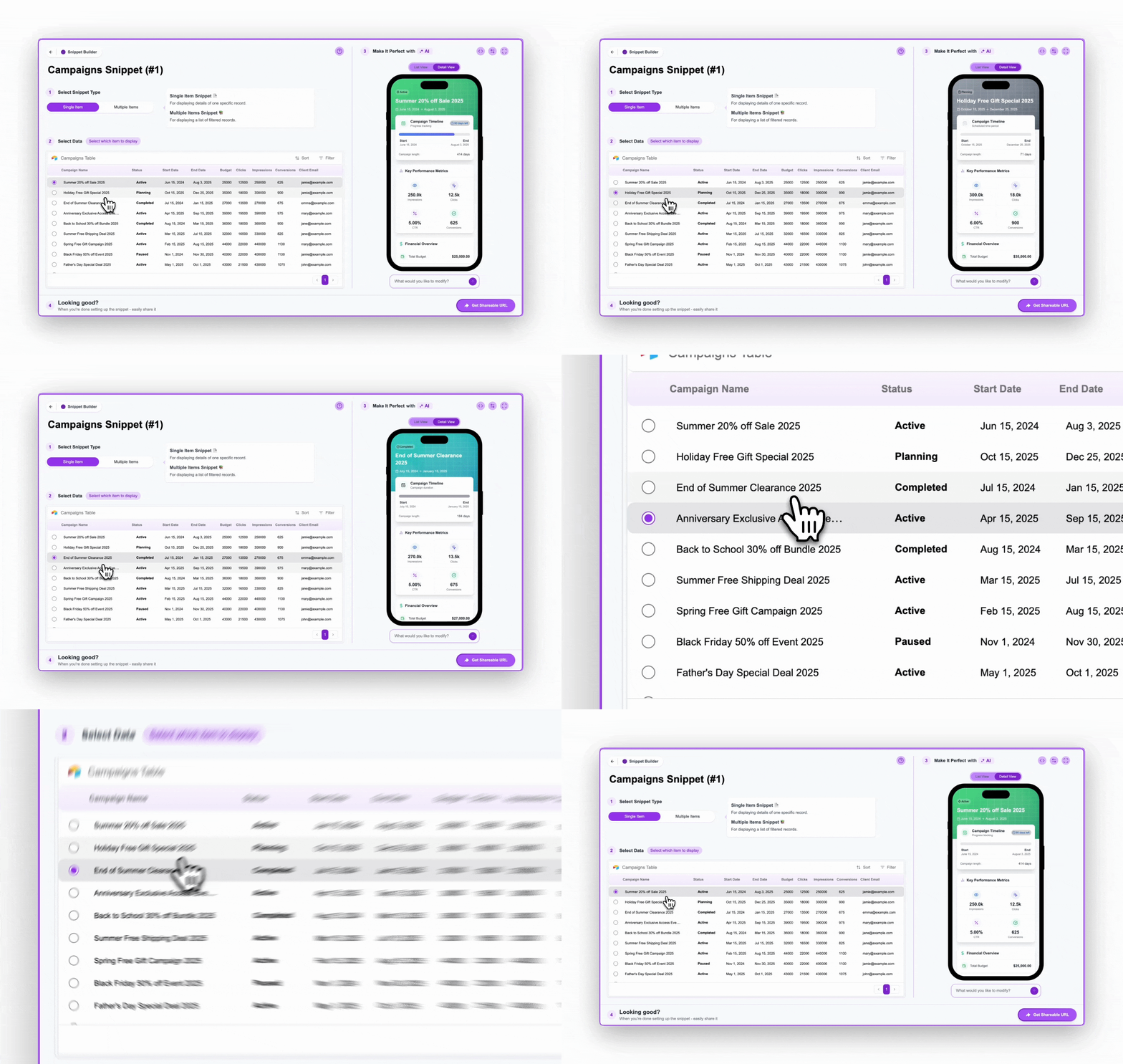 The Shareable URL for this snippet will be built to directly reference the unique ID of the record you selected. Sharing this specific URL will *always* open the snippet showing the details of that particular record.
* Learn more about selecting a specific record: [Selecting a Record for Single Item Snippets](/chapters/selecting-which-data-to-display/selecting-a-record-for-single-item-snippets)
* Learn how this affects the URL structure: [Understanding the Shareable URL Structure](/chapters/sharing-your-snippets/understanding-the-shareable-url-structure)
In Step 2, all records from your chosen table are initially available. You then define which records are *eligible* to be shown in the list using the **Filter** and **Permission** settings.
The Shareable URL for this snippet will be built to directly reference the unique ID of the record you selected. Sharing this specific URL will *always* open the snippet showing the details of that particular record.
* Learn more about selecting a specific record: [Selecting a Record for Single Item Snippets](/chapters/selecting-which-data-to-display/selecting-a-record-for-single-item-snippets)
* Learn how this affects the URL structure: [Understanding the Shareable URL Structure](/chapters/sharing-your-snippets/understanding-the-shareable-url-structure)
In Step 2, all records from your chosen table are initially available. You then define which records are *eligible* to be shown in the list using the **Filter** and **Permission** settings.
 * **Filters:** Apply static rules (e.g., `Status is "Active"`) to permanently exclude irrelevant records from being considered for the snippet. Anyone viewing the snippet, regardless of their identity, will only ever see records that pass these filters.
* **Permissions (User-based):** Apply dynamic rules based on the viewer's identity to restrict which records from the *filtered* set they are allowed to see (e.g., `Client Email is the viewer's email`). This allows the same snippet URL to show different data to different users.
* **Sorting:** Define the display order of the records in the list view.
* Learn how to set up filters and sorting: [Setting Filters & Sorting for Multiple Items Snippets](/chapters/selecting-which-data-to-display/setting-filters-and-sorting-for-multiple-items-snippets)
* Learn how permissions work: [Controlling Data Access (Permissions)](/chapters/controlling-data-access/understanding-the-permission-mechanism)
***
## How Configuration Changes Affect Shared Links
**Important**\
Read this to avoid confusion and manage your snippets effectively
**Filters and Sorting**
Any changes you make to the **Filter** or **Sort** settings in Step 2 of the builder will **immediately affect ALL** existing and future Shareable URLs for that specific snippet.
If you update a filter to exclude certain records, those records will instantly disappear from any live view of that snippet's URL.
If you need two different lists of data from the *same* table (e.g., one showing only `` `Active` `` campaigns and another showing only `` `Completed` `` campaigns), you should create two *separate* Multiple Items snippets, each with its own filter configuration.
**Permissions (User-based)**
Changing the **Permission** setting (specifically enabling or changing the permission field) in Step 2 **does NOT require you to create a new snippet URL to show different data**.
The power of user-based permission is that the *same base URL* (e.g., `` `https://app.trycrust.ai//list` ``) can present *different* data to different users because the permission value is passed *dynamically* via the URL parameter (`` `?p=` ``).
This allows you to create *one* snippet configured for user-based permission and use it to share personalized data views with many different clients.
Understanding this distinction is vital for correctly managing your shared data and creating efficient workflows.
* **Filters:** Apply static rules (e.g., `Status is "Active"`) to permanently exclude irrelevant records from being considered for the snippet. Anyone viewing the snippet, regardless of their identity, will only ever see records that pass these filters.
* **Permissions (User-based):** Apply dynamic rules based on the viewer's identity to restrict which records from the *filtered* set they are allowed to see (e.g., `Client Email is the viewer's email`). This allows the same snippet URL to show different data to different users.
* **Sorting:** Define the display order of the records in the list view.
* Learn how to set up filters and sorting: [Setting Filters & Sorting for Multiple Items Snippets](/chapters/selecting-which-data-to-display/setting-filters-and-sorting-for-multiple-items-snippets)
* Learn how permissions work: [Controlling Data Access (Permissions)](/chapters/controlling-data-access/understanding-the-permission-mechanism)
***
## How Configuration Changes Affect Shared Links
**Important**\
Read this to avoid confusion and manage your snippets effectively
**Filters and Sorting**
Any changes you make to the **Filter** or **Sort** settings in Step 2 of the builder will **immediately affect ALL** existing and future Shareable URLs for that specific snippet.
If you update a filter to exclude certain records, those records will instantly disappear from any live view of that snippet's URL.
If you need two different lists of data from the *same* table (e.g., one showing only `` `Active` `` campaigns and another showing only `` `Completed` `` campaigns), you should create two *separate* Multiple Items snippets, each with its own filter configuration.
**Permissions (User-based)**
Changing the **Permission** setting (specifically enabling or changing the permission field) in Step 2 **does NOT require you to create a new snippet URL to show different data**.
The power of user-based permission is that the *same base URL* (e.g., `` `https://app.trycrust.ai//list` ``) can present *different* data to different users because the permission value is passed *dynamically* via the URL parameter (`` `?p=` ``).
This allows you to create *one* snippet configured for user-based permission and use it to share personalized data views with many different clients.
Understanding this distinction is vital for correctly managing your shared data and creating efficient workflows.